Introduction
Have you ever loaded a paper from arxiv.org to ChatGPT or another LLM and enjoyed asking questions about it? I do. I’m a nerd. But sometimes you might want to upload a ton of papers, only to discover file size limits, or you can’t upload more than 5 papers. I’ve just released some experimental software to make that go problem go away.
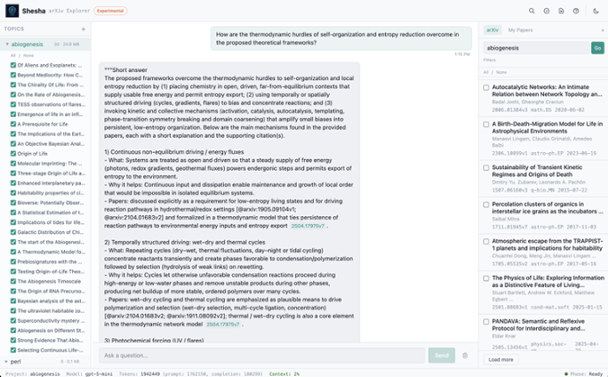
The backend is powered by my Shesha software, based on recently released research from MIT: recursive language models . These effectively allow you to extend any LLM with unlimited context. They’re fantastic at long-horizon reasoning and for many use cases, can completely eliminate the need for RAG solutions. What’s astounding is that they’re dead simple to build.
In short, all of the docs are stored in a single variable and the LLM writes Python code to figure out how to respond to your prompts!
The AI That Researches Like You Do
Most AI document tools work like a search engine. You ask a question, they find the most relevant paragraphs, and the AI reads those paragraphs to form an answer. That’s fine when the answer is sitting right there in one spot.
But what if the answer isn’t in any single paragraph? What if you need to read across 7 books to track every event in a character’s life ? What if you need to understand how an authentication system works across 40 source files ?
Shesha solves this in a surprisingly human way.
Give the AI a desk, not a search bar
When you ask Shesha a question, it doesn’t search for relevant snippets. Instead, it gives the AI something much more powerful: a workspace.
Your documents are loaded into a secure environment — think of it as a private desk where the AI can spread out all your files. The AI can see how many documents there are, how big they are, and what they’re about.
Then it starts working.
The AI writes its own research plan
Here’s where it gets interesting. The AI doesn’t follow a fixed recipe. It writes small programs to explore your documents — searching for keywords, reading specific sections, counting occurrences, comparing passages across files.
After each step, the AI sees what it found and decides what to do next. Maybe the first search turned up 15 mentions of “authentication.” Now it writes another program to read those sections in detail. Then it cross-references what it found with the configuration files. Then it checks the test files to confirm its understanding.
This loop — explore, see results, adjust, explore again — is what makes Shesha different. The AI is designing its own research strategy based on your specific question, not following a one-size-fits-all pipeline.
When the reading gets heavy, it calls for help
Some documents are too large for the AI to process in one pass. When that happens, it can delegate: “Read this 200-page document and tell me every mention of authentication.” A second AI handles that focused task and reports back, so the main AI can keep working on the bigger picture.
Think of it as a lead researcher asking a research assistant to scan a specific source — the lead stays focused on the overall question while the assistant handles the detailed reading.
The AI decides when it’s done
There’s no fixed number of steps. The AI keeps exploring until it’s confident it has the answer. Then it signals “I’m done, here’s what I found.”
For a simple factual question, this might take a few seconds and two or three steps. For a complex question that spans multiple documents, it might take several minutes and a dozen rounds of exploration.
Trust, but verify
Once the AI produces an answer, Shesha doesn’t just take its word for it. It runs two layers of verification:
- Citation check: Did the AI reference real documents? Do the quotes it cited actually appear in those documents, word for word?
- Adversarial review: A separate AI reads the answer and actively tries to find flaws — unsupported claims, logical gaps, or misinterpretations.
This is like peer review: the answer has to survive scrutiny before it reaches you.
# Everything runs in a locked room
All the code the AI writes runs in an isolated container — a sealed-off environment with no access to the internet, your filesystem, or anything outside the documents you gave it. If the AI writes bad code, it can’t do any damage. The worst that happens is it gets an error message and tries a different approach.
Putting it all together
So when you ask Shesha “What are the major events in Carthoris’s life across all 7 Barsoom novels?“, here’s what actually happens:
- Your 7 novels are loaded into a secure workspace
- The AI writes code to search all 7 books for mentions of Carthoris
- It sees hundreds of results and writes more code to read each passage in detail
- For the longest books, it delegates focused reading to a helper AI
- It organizes everything chronologically, pulling supporting quotes
- It notices a contradiction between two books and flags it
- It signals it’s done: here are 30 events with citations
- Shesha verifies the citations actually exist in the source material
- You get the answer, the full reasoning trace, and the verification report
That whole process designed on the fly by the AI, not pre-programmed is what lets Shesha handle questions that other tools can’t handle.